Web Application Testing, Deployment, and Modern Trends

Table of Contents
- Full-Stack Development
- Testing and Quality Assurance
- DevOps and CI/CD
- Progressive Web Apps
- Responsive Design and Usability
- Questions
6.1 Full-Stack Development
6.1.1 Understanding Full-Stack Architecture
Full-stack development refers to the practice of working across all layers of a web application, from the user-facing interface to the server-side logic and underlying infrastructure. A full-stack developer possesses sufficient knowledge to build features spanning multiple layers, debug issues that cross system boundaries, and make informed architectural decisions.
A modern web application comprises four principal layers:
- Frontend (Client-Side) — The layer rendered in the user's browser, responsible for presenting data and capturing input. It is built with HTML (structure), CSS (styling), JavaScript (interactivity), and optionally a frontend framework such as React, Vue, or Angular.
- Backend (Server-Side) — The server-hosted logic that powers the application, including a server-side language (Python, JavaScript, Java), a web framework (Django, Flask, Express, Spring), business rules, and API endpoints for frontend communication.
- Database Layer — Stores and manages application data through a database management system (PostgreSQL, MySQL, MongoDB), data models, schemas, and queries.
- Infrastructure Layer — The servers, networks, and services that host the application, including web servers (Nginx, Apache), cloud platforms (AWS, Azure, Google Cloud), containerisation (Docker), and orchestration (Kubernetes).
6.1.2 Frontend-Backend Integration
In modern web applications the frontend and backend are typically developed as separate systems that communicate through APIs (Application Programming Interfaces). This separation yields several benefits: each part focuses on its specific responsibility (separation of concerns); frontend and backend teams can develop and deploy independently as long as the API contract is agreed upon (independent development); the same backend can serve multiple clients—web, mobile, and desktop (multiple clients); and each layer can be scaled according to its own resource demands (scalability).
The most common communication pattern is request-response: the user performs an action, the frontend sends an HTTP request to a backend API endpoint, the backend processes the request, returns an HTTP response, and the frontend updates the UI accordingly.
RESTful APIs
REST (Representational State Transfer) is the dominant architectural style for web APIs. RESTful APIs map HTTP methods to CRUD operations on resources:
Table 6.1: RESTful HTTP methods.
| HTTP Method | Operation | Example |
|---|---|---|
| GET | Read | Fetch list of users |
| POST | Create | Create a new user |
| PUT | Update (replace) | Update entire user record |
| PATCH | Update (partial) | Update user's email only |
| DELETE | Delete | Remove a user |
JSON (JavaScript Object Notation) is the standard data format for API communication, chosen for its lightweight, human-readable, and easily parsed structure:
{ "id": 1, "name": "John Doe", "email": "[email protected]", "created_at": "2024-01-15T10:30:00Z" }
Listing 6.1: A typical JSON API response object.
When the frontend receives a response it must handle a range of scenarios: rendering data on success, displaying error messages on failure, showing loading indicators while awaiting a response, and presenting appropriate empty-state messages when no data is available.
6.1.3 Build Pipeline
A build pipeline is a series of automated steps that transform source code into a deployable application, ensuring consistent building, testing, and packaging with every change.
Frontend Build Process
Modern frontend builds involve several stages. Transpilation converts modern JavaScript (ES6+) into browser-compatible code via tools such as Babel. Bundling combines hundreds of JavaScript modules into fewer files using Webpack, Vite, or Parcel, reducing HTTP requests. Minification removes whitespace and comments to reduce file size. Tree shaking eliminates unused code from the final bundle. Code splitting divides the application into on-demand chunks so that users download only the code required for the current page. Asset optimisation compresses images and optimises fonts.
Backend Build Process
Backend builds differ in focus: dependencies are installed via package managers (pip, npm); compiled languages (Java, Go) require compilation; database schema changes are applied through migration scripts; in Django, static files are collected into a single directory for serving; and environment-specific configurations are applied.
Build Environments
Applications typically progress through three environments. The development environment runs on the developer's local machine with debug mode, detailed error messages, hot reloading, and test data. The staging environment mirrors production and is used for final testing with realistic data by QA teams. The production environment hosts the live application with optimised performance, disabled debug mode, real user data, and monitoring.
6.1.4 API Integration
API integration is the process of connecting software systems through their APIs. In full-stack development this primarily involves connecting the frontend to its own backend (first-party APIs), but also includes integrating with third-party services such as payment gateways (Stripe, PayPal), authentication providers (Google, Facebook OAuth), mapping services (Google Maps), email services (SendGrid, Mailgun), and cloud storage (AWS S3). Public APIs provide open access to data such as weather, currency exchange rates, and public datasets.
Effective API integration follows several key practices: storing API keys and URLs in environment variables rather than hard-coding them; implementing robust error handling and fallback mechanisms for third-party failures; using retry logic with exponential backoff for transient errors; caching responses where appropriate to reduce latency and call volume; respecting rate limits through throttling; and tracking API version usage with monitoring for deprecation notices.
# views.py import os import requests from django.http import JsonResponse def get_weather(request): city = request.GET.get('city', 'London') api_key = os.environ.get('WEATHER_API_KEY') response = requests.get( f'https://api.weather.com/data?city={city}&key={api_key}' ) if response.status_code == 200: return JsonResponse(response.json()) else: return JsonResponse({'error': 'Failed to fetch weather'}, status=500)
Listing 6.2: Third-party API integration in a Django view, illustrating environment variable usage and error handling.
6.2 Testing and Quality Assurance
Testing is the process of evaluating software to confirm that it meets requirements and functions correctly. Quality Assurance (QA) is the broader discipline of preventing defects through planned, systematic activities. Together, they ensure software reliability and user satisfaction.
6.2.1 Why Testing Matters
Defects discovered late in development or after deployment are exponentially more expensive to fix than those caught early. A production bug may require emergency patches, rollbacks, data recovery, customer support intervention, and can cause reputational damage.
Table 6.2: Relative cost of fixing bugs at different stages.
| Stage | Relative Cost |
|---|---|
| Requirements | 1× |
| Design | 5× |
| Development | 10× |
| Testing | 20× |
| Production | 100×+ |
Beyond cost reduction, testing confers several benefits. Tests give developers confidence in changes—if tests pass after a modification, the code likely still works. Tests serve as documentation of expected behaviour: reading tests reveals how code is supposed to work. Writing tests encourages better code design, since testable code is typically well-structured. Tests prevent regressions—bugs introduced when fixing other bugs or adding features. Although initial test authoring requires time, testing ultimately accelerates development by reducing debugging effort.
6.2.2 Types of Testing and the Testing Pyramid
Testing can be categorised by scope, method, and timing. The testing pyramid is a widely adopted model recommending many unit tests (base), fewer integration tests (middle), and even fewer end-to-end tests (top).
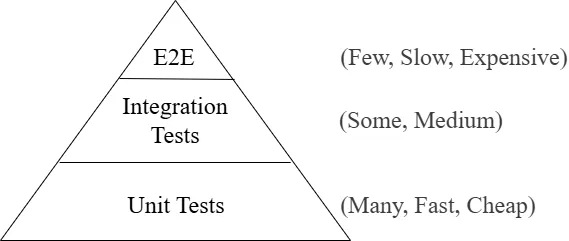
Figure 6.1: The testing pyramid. Unit tests form the broad base; integration and end-to-end tests occupy successively narrower upper tiers.
- Unit tests verify individual components in isolation. They are fast, cheap, and should constitute the majority of the test suite.
- Integration tests verify that components work together correctly. They are more complex and slower but catch issues that unit tests miss.
- End-to-end (E2E) tests exercise complete user workflows through the full application stack. They are the slowest and most expensive, and should focus on critical paths.
6.2.3 Unit Testing
Unit testing is the practice of testing individual units of code—typically a function, method, or class—in isolation. Good unit tests are isolated (independent of external systems; dependencies are replaced with mocks or stubs), fast (milliseconds per test), repeatable (same results regardless of order or environment), self-validating (clearly indicate pass or fail), and timely (written close to when the code is written).
The Arrange-Act-Assert (AAA) Pattern
Unit tests conventionally follow three phases: Arrange (set up test conditions—create objects, prepare inputs), Act (invoke the code under test), and Assert (verify that the results match expectations).
# tests.py from django.test import TestCase from .models import Product class ProductModelTest(TestCase): def test_product_has_discount_price(self): # Arrange product = Product(name='Laptop', price=1000, discount_percent=10) # Act discounted_price = product.get_discounted_price() # Assert self.assertEqual(discounted_price, 900)
Listing 6.3: A Django unit test following the AAA pattern.
Unit tests are most valuable for pure functions, calculation logic, data transformations, validation logic, model methods, and utility functions. They are not appropriate for testing framework internals (e.g., Django's ORM), third-party libraries, trivial getters/setters, or database queries (which belong to integration tests).
6.2.4 Integration Testing
Integration testing verifies that different units work together correctly. While unit tests check components individually, integration tests validate the connections between them.
Types of integration testing include component integration (multiple classes or modules within the application), database integration (correct data persistence, retrieval, and update), API integration (correct communication with internal and external APIs), and service integration (interactions with external services such as email, payment, or cloud storage).
Integration testing approaches vary in direction: top-down testing begins at the top-level components and substitutes stubs for lower levels; bottom-up testing begins at the lowest-level components and uses drivers for higher levels; big bang integration tests all components simultaneously, which is simpler but makes fault isolation harder; and incremental testing integrates and tests one component at a time, enabling earlier detection of issues.
# tests.py from django.test import TestCase from django.urls import reverse from .models import Article class ArticleViewTest(TestCase): def setUp(self): Article.objects.create(title='Test Article', content='Test content') def test_article_list_displays_articles(self): response = self.client.get(reverse('article-list')) self.assertEqual(response.status_code, 200) self.assertContains(response, 'Test Article')
Listing 6.4: A Django integration test verifying that a view correctly retrieves and displays database records.
Django supports integration testing through several mechanisms: a test database created afresh for each test run; fixtures for loading predefined data; factories (e.g., factory_boy) for generating dynamic test data; and transaction rollback, whereby each test runs in a transaction that is rolled back to prevent inter-test contamination.
6.2.5 UI Testing (End-to-End Testing)
UI testing—also called end-to-end (E2E) testing—tests the application from the user's perspective by simulating real interactions with the complete system, including browser, frontend, backend, and database. UI tests exercise the entire system stack rather than isolated components. They are written from the user's viewpoint (clicking buttons, filling forms, navigating pages) and are consequently slower, more brittle (susceptible to UI changes, timing issues, and environmental factors), but catch issues that other test types miss.
UI tests should focus on critical user paths: registration and login, core business workflows, payment and checkout processes, important form submissions, and navigation between key pages.
Common UI testing tools include Selenium (the most established browser automation tool, supporting multiple browsers and languages), Playwright (a modern, fast, multi-browser tool by Microsoft), Cypress (a JavaScript-based framework designed for web applications, running tests directly in the browser), and Puppeteer (a Node.js library for controlling Chrome/Chromium, well suited for headless testing).
# UI test using Selenium from selenium import webdriver from selenium.webdriver.common.by import By def test_user_can_login(): # Arrange driver = webdriver.Chrome() driver.get('http://localhost:8000/login') # Act driver.find_element(By.NAME, 'username').send_keys('testuser') driver.find_element(By.NAME, 'password').send_keys('testpass123') driver.find_element(By.ID, 'login-button').click() # Assert welcome_message = driver.find_element(By.ID, 'welcome').text assert 'Welcome, testuser' in welcome_message driver.quit()
Listing 6.5: A Selenium-based UI test verifying the login workflow.
Best practices for UI testing include using stable selectors (IDs or data attributes rather than CSS classes), employing explicit waits instead of fixed delays, keeping tests independent with their own setup data, focusing efforts on the most critical user journeys, and resetting application state before each test.
6.2.6 Other Testing Types
Several additional testing categories address specialised quality dimensions:
- Functional testing validates that the application behaves according to its stated requirements.
- Regression testing confirms that existing functionality still works after code changes. It is typically automated and run after every commit.
- Performance testing evaluates behaviour under load, including load testing (expected user numbers), stress testing (beyond expected capacity), spike testing (sudden traffic surges), and endurance testing (sustained load over time).
- Security testing identifies vulnerabilities through penetration testing, vulnerability scanning, security-focused code review, and OWASP-based assessment.
- Usability testing measures user experience with real participants, examining task completion rates, satisfaction, error rates, and time-on-task.
- Accessibility testing ensures the application is usable by people with disabilities, covering screen reader compatibility, keyboard navigation, colour contrast, and ARIA labels.
6.2.7 Test Automation
Test automation is the use of software to execute tests automatically, compare actual results with expected outcomes, and report findings. It replaces manual testing for repetitive test cases, offering speed (hundreds of tests in minutes), consistency (identical execution each time), reusability (negligible marginal cost per re-run), broader coverage, and the early feedback essential for CI/CD pipelines.
Automation is most valuable for repetitive tests, stable features, data-intensive scenarios with many input variations, regression test suites, and performance tests requiring simulated loads. Conversely, exploratory testing (requiring human creativity), tests for rapidly changing features, one-time tests, and usability testing (requiring subjective human judgment) are better performed manually.
Test automation strategy should be layered: begin with unit tests (easiest to write and maintain), then add integration tests for critical system interactions, automate only the most important E2E user journeys, maintain tests as the application evolves, and monitor test health by tracking failures, flakiness, and execution time.
6.2.8 Test-Driven Development (TDD)
Test-Driven Development is a software development approach in which tests are written before the code they test, following a three-step cycle:
- Red — Write a test for functionality that does not yet exist. Run it and confirm it fails.
- Green — Write the minimum code necessary to make the test pass.
- Refactor — Improve code structure, remove duplication, and clean up while ensuring all tests still pass.
This cycle is repeated for each new requirement. TDD produces better interfaces (because writing tests first forces consideration of how code will be consumed), high test coverage (every feature has tests by construction), developer confidence, living documentation, and reduced debugging time (bugs are caught immediately).
# Step 1: Write a failing test def test_calculate_tax(): result = calculate_tax(100, 0.1) assert result == 10 # Step 2: Write minimum code to pass def calculate_tax(amount, rate): return amount * rate # Step 3: Refactor if needed
Listing 6.6: A simple TDD example showing the red-green-refactor cycle.
6.2.9 Quality Assurance (QA)
Quality Assurance is a systematic approach to ensuring that products meet quality standards. While testing focuses on detecting defects in the product, QA focuses on preventing defects through processes, standards, and continuous improvement.
Table 6.3: QA versus testing.
| Aspect | QA | Testing |
|---|---|---|
| Focus | Prevention | Detection |
| Scope | Entire process | Product itself |
| Timing | Throughout development | Specific phases |
| Goal | Build quality in | Find defects |
| Approach | Process-oriented | Product-oriented |
QA activities encompass process definition (coding standards, code review processes, documentation requirements, release procedures), reviews and audits (code reviews, design reviews, process audits, compliance checks), metrics and measurement (defect rates, test coverage, code complexity, technical debt), and training and improvement (developer education, process improvement initiatives, lessons-learned reviews).
Code reviews are a critical QA practice in which developers examine each other's code before merging. Reviews catch bugs early, disseminate knowledge, improve code quality, and enforce standards. Reviewers look for logic errors, security vulnerabilities, performance issues, style violations, and documentation completeness.
6.2.10 Testing Best Practices
Effective testing practice follows several principles: write tests early in development rather than retroactively; keep tests simple, readable, and maintainable; verify one assertion per test to make failures unambiguous; use descriptive test names that communicate what is being tested and the expected outcome; test edge cases, boundary conditions, and error scenarios in addition to the happy path; keep tests independent of each other and of execution order; test behaviour rather than implementation details so that tests do not break when internals change; treat test code with the same quality standards as production code; and run tests after every change, ideally through automated CI/CD pipelines.
# Bad def test_user(): pass # Good def test_user_creation_with_valid_email_succeeds(): pass
Listing 6.7: Descriptive test naming convention.
6.3 DevOps and CI/CD
DevOps is a set of practices that combines software development (Dev) and IT operations (Ops) to shorten the development lifecycle and deliver high-quality software continuously. It emphasises collaboration, automation, and monitoring across all stages of software delivery.
6.3.1 Understanding DevOps
DevOps is not merely a toolset or job title; it is a cultural and professional movement that stresses communication and collaboration between developers and operations professionals. Its core philosophy holds that those who build software should also share responsibility for running it. Traditional siloed approaches—where developers wrote code and "threw it over the wall" to operations—led to conflicts, long release cycles, and finger-pointing. DevOps eliminates these barriers by making everyone responsible for the entire application lifecycle.
The DevOps Lifecycle
The lifecycle is commonly represented as an infinity loop, symbolising its continuous nature. The Plan phase defines requirements and user stories using agile methodologies. Develop involves writing code, creating tests, and conducting reviews using version control (Git). Build compiles code, runs quality checks, packages artifacts, and is typically automated through CI systems. Test runs automated unit, integration, and E2E tests to catch bugs early. Release prepares the application for deployment through final testing and approval processes. Deploy moves the application to production using safe strategies with monitoring and rollback readiness. Operate manages the running application, infrastructure, and incident response. Monitor continuously tracks performance, user behaviour, and system health through metrics, logs, and alerts.
DevOps Principles
Five principles underpin DevOps practice. Automation reduces errors, increases speed, and frees engineers for higher-value work—encompassing builds, tests, deployments, and monitoring. Continuous improvement drives teams to refine processes, tools, and products through post-incident reviews and metrics tracking. Customer focus ensures all efforts deliver user value, with success measured by customer outcomes rather than internal metrics. Collaboration breaks down organisational silos so that development, operations, security, and business teams work together. Fail fast, learn fast embraces experimentation: small, frequent releases keep failures small and easily remedied, and blameless post-mortems prioritise learning over blame.
6.3.2 Continuous Integration (CI)
Continuous Integration is the practice of integrating code into a shared repository frequently—typically multiple times per day—with each integration verified by an automated build and test suite. Before CI, developers worked in isolation for days or weeks, creating large batches of changes that led to painful merge conflicts. CI makes integration a routine, low-risk event.
The CI process follows a predictable sequence. Developers commit small, logical units of work to a version control system. The CI system automatically triggers an automated build, compiling code, resolving dependencies, and creating artifacts. After a successful build, automated tests (unit and integration) run against the code; any failure halts the pipeline and alerts the team. Code quality analysis—including static analysis, security scanning, and coverage reports—identifies additional problems. If all checks pass, the code is merged to the main branch, which should always remain in a deployable state.
CI provides early bug detection (defects found at the point of introduction), reduced integration risk (small, frequent merges versus large, infrequent ones), faster feedback (developers learn within minutes whether their changes work), improved collaboration (awareness of others' work and collective code ownership), and a perpetually deployable main branch.
Key CI practices include committing at least once per day, fixing broken builds immediately (the highest-priority issue for the team), keeping builds fast (under 10 minutes), testing in production-like environments (containers help ensure consistency), and making every build self-testing with comprehensive automated tests.
6.3.3 Continuous Delivery and Continuous Deployment (CD)
Continuous Delivery extends CI by ensuring that code is always in a deployable state and can be released to production at any time with minimal manual effort. Releasing becomes a business decision rather than a technical challenge.
Continuous Deployment goes further: every change that passes all automated checks is deployed to production without human intervention. The distinction between the two is the presence or absence of a manual approval gate. Most organisations begin with Continuous Delivery and progress to Continuous Deployment as automation maturity and confidence grow.
The CD Pipeline: A CD pipeline is an automated workflow from development to production, with each stage adding confidence. The source stage begins when changes are pushed. The build stage produces versioned, deployable artifacts. The test stage runs multiple test types in sequence (unit → integration → E2E → performance). Staging deployment mirrors production for manual validation and stakeholder preview. An approval gate (manual in Continuous Delivery, automated in Continuous Deployment) precedes production deployment, which uses safe strategies with monitoring and rollback readiness.
Deployment Strategies
- Rolling deployment — New versions are gradually rolled out to servers; problems affect only a portion of users, and the deployment can be paused or reverted.
- Blue-green deployment — Two identical environments (blue = current, green = new) exist simultaneously. Traffic switches to green once verified; rollback is instant by switching back to blue.
- Canary deployment — The new version is deployed to a small subset of users first. Metrics are monitored, and the rollout gradually expands to all users if successful.
- Feature flags — New features are deployed to production but hidden behind configuration toggles, separating deployment from feature release and enabling targeted rollout.
CD benefits include faster time to market, lower risk (small, frequent, reversible releases), higher quality through automation, reduced deployment stress (routine events, not emergencies), and rapid user feedback enabling data-driven product decisions.
6.3.4 CI/CD Pipelines
A CI/CD pipeline is an automated sequence of stages through which code passes from development to production. Pipelines are defined as code—typically in YAML—and are version-controlled alongside application code. Their anatomy consists of triggers (events such as code pushes, pull requests, or schedules that start the pipeline), jobs (units of work that may run in parallel or sequentially), steps (individual commands or actions within a job), stages (groups of related jobs, commonly build → test → deploy), artifacts (files produced by one stage and consumed by another, such as binaries or test reports), and environment variables (configuration and secrets injected at runtime).
6.3.5 GitHub Actions
GitHub Actions is a CI/CD platform integrated directly into GitHub, allowing automation of build, test, and deployment workflows from the repository. Its core concepts include workflows (YAML-defined automated processes in .github/workflows/), events (triggers such as pushes, pull requests, releases, or schedules), jobs (sets of steps running on the same runner), steps (sequential commands or reusable actions within a job), actions (reusable units of code from GitHub, the community, or custom implementations), and runners (servers executing workflows—GitHub-hosted or self-hosted).
name: CI Pipeline on: push: branches: [main] pull_request: branches: [main] jobs: build: runs-on: ubuntu-latest steps: - uses: actions/checkout@v4 - name: Set up Python uses: actions/setup-python@v4 with: python-version: "3.11" - name: Install dependencies run: pip install -r requirements.txt - name: Run tests run: python -m pytest
Listing 6.8: A basic GitHub Actions workflow file.
Common workflow patterns include pull request checks (running tests and quality checks on every PR to prevent broken merges), deployment workflows (deploying to different environments based on branch or tag, with approval gates for production), scheduled workflows (nightly builds verifying external dependencies, scheduled security scans), and matrix builds (testing against multiple dependency versions in a single workflow).
6.3.6 Introduction to Docker
Docker is a platform for developing, shipping, and running applications in containers—lightweight, standalone, executable packages that include everything needed to run software: code, runtime, system tools, libraries, and settings. Containers solve the "it works on my machine" problem by packaging applications with their dependencies in a portable format.
Containers versus Virtual Machines
Virtual machines run a complete operating system on virtualised hardware, making them resource-intensive and slow to start. Containers share the host OS kernel, consuming far fewer resources and starting in seconds.
Table 6.4: Containers versus virtual machines.
| Aspect | Virtual Machines | Containers |
|---|---|---|
| Isolation | Full OS isolation | Process isolation |
| Size | Gigabytes | Megabytes |
| Startup time | Minutes | Seconds |
| Resource usage | High | Low |
| Portability | Hardware-dependent | Highly portable |
| Operating system | Any OS | Shares host kernel |
Key Docker concepts include images (read-only templates built from Dockerfiles, stored in registries, and organised in layers), containers (runnable instances of images, isolated from each other and the host), Dockerfiles (text files with build instructions, each creating a layer), registries (repositories that store and distribute images; Docker Hub is the default public registry), and volumes (persistent storage outside the container's ephemeral filesystem).
Docker provides environmental consistency (identical behaviour across development, testing, and production), application isolation (eliminating dependency conflicts), portability (runs on any system with Docker installed), resource efficiency (more applications per host than VMs, with rapid scaling), and version control for images (enabling rollback and audit).
# Use an official Python runtime as the base image FROM python:3.11-slim # Set the working directory in the container WORKDIR /app # Copy requirements file and install dependencies COPY requirements.txt . RUN pip install --no-cache-dir -r requirements.txt # Copy the application code COPY . . # Expose the port the app runs on EXPOSE 8000 # Command to run the application CMD ["python", "manage.py", "runserver", "0.0.0.0:8000"]
Listing 6.9: A Dockerfile for a Django application. Each instruction creates an image layer: FROM specifies the base image, WORKDIR sets the working directory, COPY transfers files, RUN executes build-time commands, EXPOSE documents the listening port, and CMD defines the runtime command.
6.3.7 Deployment Workflows, Infrastructure as Code, and Monitoring
Development-to-production pipeline
A typical deployment workflow progresses through: local development (writing code, running unit tests, committing to a feature branch), pull request and review (CI pipeline runs automatically; peers review code), merge to main (CI re-runs on merged code to catch integration issues), deploy to staging (automatic deployment to a production-mirror environment for QA validation), and production deployment (deployment with monitoring and rollback readiness).
Infrastructure as Code (IaC) is the practice of managing infrastructure through version-controlled code rather than manual configuration. IaC provides repeatability (consistent environment recreation), version control (tracked and reviewable changes), documentation (code as living specification), automation (scripted provisioning), and testability (changes validated before application). Common IaC tools include Terraform (cloud-agnostic provisioning), AWS CloudFormation (AWS-specific templates), Ansible (configuration management), and Kubernetes (container orchestration).
Monitoring and observability are essential post-deployment practices. Logging collects centralised logs from all instances for debugging and behavioural analysis. Metrics track numerical values over time—response times, error rates, CPU usage—visualised on dashboards with threshold-based alerting. Tracing follows requests across distributed services to identify performance bottlenecks. Alerting notifies on-call teams of problems before users are affected, with effective alerts being actionable and not excessively noisy.
6.4 Progressive Web Apps
Progressive Web Apps (PWAs) are web applications that use modern web technologies to deliver app-like experiences. They combine the reach of the web with the capabilities of native applications, offering offline functionality, push notifications, and device installation.
6.4.1 Understanding Progressive Web Apps
A PWA is a web application that meets specific criteria for reliability, performance, and user experience. The term "progressive" signifies that the app works for every user regardless of browser, enhancing progressively based on browser capabilities. PWAs are not a single technology but a set of best practices and features that any web application can adopt incrementally.
PWA characteristics
PWAs are progressive (function everywhere, with enhanced features on modern browsers), responsive (adapt to desktop, mobile, and tablet form factors), connectivity independent (work offline or on poor networks via service workers), app-like (use the app shell model for instant loading and smooth interactions), fresh (always up to date through background service worker updates), safe (served over HTTPS to protect data and prevent tampering), discoverable (identifiable by search engines through the web app manifest), re-engageable (support push notifications even when the browser is closed), installable (can be added to the home screen without an app store), and linkable (shareable via URL with deep linking support).
Table 6.5: PWAs versus native applications.
| Aspect | PWA | Native App |
|---|---|---|
| Distribution | Web / install prompt | App store |
| Updates | Automatic | User-initiated |
| Discovery | Search engines | App store search |
| Development | Web technologies | Platform-specific |
| Reach | All devices with browser | Specific platform |
| Capabilities | Growing rapidly | Full device access |
| Offline support | Via service workers | Built-in |
| Installation | No store required | App store required |
6.4.2 Service Workers
A service worker is a JavaScript script that the browser runs in the background, separate from the web page. It acts as a programmable network proxy, intercepting requests and deciding how to handle them. Service workers enable offline functionality, background sync, and push notifications, forming the foundation of PWA capabilities.
Service worker lifecycle
The lifecycle comprises five stages. Registration is initiated by the web page via JavaScript, telling the browser where to find the service worker file. During installation the service worker can pre-cache essential resources. After installation, activation occurs, during which old caches can be cleaned up; new service workers wait for existing ones to be released. When not handling events, the service worker enters an idle state and may be terminated by the browser to conserve resources. On network requests, the fetch event fires, allowing the service worker to respond with cached resources or fetch from the network.
Service workers have a scope determined by the directory containing the service worker file. They operate exclusively over HTTPS (except localhost for development) to prevent man-in-the-middle attacks. Key capabilities include offline support (caching and serving resources without connectivity), background sync (deferring actions until connectivity returns), push notifications (receiving messages even when the browser is closed), and fine-grained cache management.
6.4.3 Caching Strategies
Caching stores copies of resources for fast retrieval without network requests. Service workers provide precise control over caching behaviour through several strategies:
- Cache-first — The service worker checks the cache before the network. Best for static assets that rarely change (CSS, JavaScript, images) where performance is paramount. Trade-off: users may see stale content.
- Network-first — The service worker tries the network first, falling back to the cache on failure. Best for content that must be fresh (news, user data). Trade-off: slower on poor connections.
- Stale-while-revalidate — The cached response is returned immediately while a background fetch updates the cache. Best for frequently accessed resources where approximate freshness is acceptable. Trade-off: the first request shows stale content.
- Cache-only — Only cached resources are served; the network is never consulted. Suitable for pre-cached static resources and offline-first applications. Trade-off: new resources require a service worker update.
- Network-only — Every request goes to the network with no caching—the default browser behaviour. Appropriate for real-time data and requests that should never be cached (e.g., analytics). Trade-off: no offline support.
6.4.4 Offline-First Approach
Offline-first is a design philosophy in which the application is built to function offline as the default state, treating network connectivity as an enhancement rather than a requirement. Traditional web applications assume connectivity and fail when offline; offline-first applications assume disconnection and enhance when connected.
Principles of offline-first design include designing for offline by identifying essential features that must work without a network; caching aggressively by pre-caching essential resources and updating caches in the background; syncing when connected by storing user actions locally and synchronising to the server when connectivity returns (handling conflicts gracefully); showing connectivity status to keep users informed; and degrading gracefully by providing reduced but functional capabilities when connectivity is limited.
Offline-first applications benefit from reliability (functional regardless of network conditions), performance (cached resources load instantly), consistent user experience (uninterrupted work with automatic sync), and reduced server load (most requests served locally).
Implementation techniques include the app shell model (caching the minimal HTML, CSS, and JavaScript UI skeleton for instant loading, with content loaded dynamically), IndexedDB (a browser database for storing structured data offline, larger than localStorage and persistent across sessions), and background sync (deferring network requests until connectivity is restored, even after the browser is closed).
6.4.5 Web App Manifest
The web app manifest is a JSON file that provides metadata about the application to the browser. It controls how the application behaves when installed on the user's device and enables the "Add to Home Screen" prompt.
Key manifest properties include name and short_name (the full and abbreviated application names), start_url (the entry-point page when the app is launched), display (controls the chrome shown: fullscreen, standalone, minimal-ui, or browser—most PWAs use standalone), background_color (shown during app loading for a smooth visual transition), theme_color (customises browser UI elements to match the app's branding), icons (home-screen and splash-screen images in multiple sizes, commonly 192×192 and 512×512 pixels), scope (defines which URLs are considered part of the app), and orientation (locks to portrait, landscape, or any).
{ "name": "My Progressive Web App", "short_name": "MyPWA", "description": "An example progressive web application", "start_url": "/", "display": "standalone", "background_color": "#ffffff", "theme_color": "#3f51b5", "orientation": "any", "icons": [ { "src": "/icons/icon-192.png", "sizes": "192x192", "type": "image/png" }, { "src": "/icons/icon-512.png", "sizes": "512x512", "type": "image/png" } ] }
Listing 6.10: A complete web app manifest file.
The manifest is linked in the HTML <head> section:
<link rel="manifest" href="/manifest.json" />
Listing 6.11: Linking the manifest in HTML.
6.4.6 PWA Installation
Modern browsers prompt users to install PWAs when certain criteria are met: the app is served over HTTPS, has a valid web app manifest, has a registered service worker, and satisfies browser-specific user engagement heuristics. Developers can customise the install experience by listening for the beforeinstallprompt event to defer the prompt and display a contextual install button at an appropriate moment.
Best practices include not showing the install prompt immediately on first visit, waiting until the user has engaged with the app, explaining the benefits of installation, and allowing dismissal without repeated prompting.
Once installed, a PWA launches from the home screen or app drawer, runs in its own window, appears in the task switcher, can receive push notifications, and works offline. Updates are delivered automatically through service worker updates.
6.5 Responsive Design and Usability
Responsive design and usability are interconnected disciplines that ensure web applications work effectively for all users regardless of device, screen size, or ability. Responsive design adapts visual presentation across screen dimensions, while usability ensures efficient and satisfying goal completion.
6.5.1 Understanding Responsive Design
Responsive web design (RWD) is a design philosophy and technical approach in which a single website automatically adjusts its layout, images, and content to provide an optimal viewing experience across a wide range of devices. Rather than maintaining separate mobile and desktop sites—an approach that was common before Ethan Marcotte articulated the concept in 2010—responsive design uses flexible systems that adapt like water filling a container.
The need for responsive design stems from the proliferation of devices with screen widths ranging from 320 pixels to over 2560 pixels. User expectations demand correct functionality on any device, and Google's mobile-first indexing means that mobile experience directly affects search rankings. From a development perspective, a single responsive codebase is more efficient than maintaining multiple site versions.
Core principles of responsive design:
- Fluid grids replace fixed pixel values with relative units such as percentages. Layout relationships are defined proportionally (e.g., a sidebar occupies 25% of available width) rather than absolutely, allowing content to reflow across screen sizes.
- Flexible images and media are constrained to their containers via CSS (e.g.,
max-width: 100%) to prevent overflow and distortion. Responsive image techniques (srcset,<picture>) serve appropriately sized files to different devices, optimising bandwidth and load times. - Media queries apply different CSS rules based on device characteristics—most commonly viewport width. When a media query matches the current conditions, its rules take effect, enabling entirely different layouts from a single stylesheet.
6.5.2 The Mobile-First Approach
Mobile-first design is a strategy in which the design process begins with the smallest screen sizes and progressively adds complexity for larger screens, inverting the traditional desktop-first methodology. Popularised by Luke Wroblewski in 2009, it is both a mindset (treating mobile users as primary) and a technical strategy (writing base CSS for mobile and using min-width media queries for larger screens).
Mobile-first matters for several reasons. Performance is improved because base styles are optimised for constrained environments; desktop enhancements are loaded only when needed, unlike desktop-first approaches where mobile users download and override unnecessary stylesheets. Content prioritisation is enforced by limited mobile screen real estate, resulting in cleaner, more focused designs across all sizes. User behaviour has shifted: mobile internet usage surpasses desktop globally, making mobile the majority experience. Mobile-first naturally aligns with progressive enhancement, ensuring core content works under the most constrained conditions and layering enhancements for more capable devices.
/* Base mobile styles - no media query needed */ .navigation { display: none; } .navigation.open { display: block; } /* Styles for larger screens */ @media (min-width: 768px) { .navigation { display: flex; } }
Listing 6.12: Mobile-first CSS. Base styles assume a mobile layout; a min-width media query enhances for larger screens.
6.5.3 Breakpoints
Breakpoints are the specific viewport widths at which a website's layout changes to accommodate different screen sizes. They define where media queries activate, triggering layout transitions. The term suggests the point at which the current design "breaks" or ceases to function well.
Table 6.6: Common breakpoint ranges.
| Range | Target Devices | Typical Layout |
|---|---|---|
| 320px–575px | Smartphones (portrait) | Single-column, hamburger menus, full-width images |
| 576px–767px | Larger phones, landscape smartphones | Some two-column layouts may appear |
| 768px–991px | Tablets (portrait) | Two-column designs, visible sidebars |
| 992px–1199px | Tablets (landscape), small laptops | Full multi-column layouts, desktop navigation |
| ≥ 1200px | Desktops and large laptops | Full intended layout with maximum content density |
While standard breakpoints are convenient, the most thoughtful designs use content-based breakpoints, adding media queries wherever the content becomes awkward—where text lines grow too long, elements overlap, or the layout feels unbalanced—rather than targeting specific devices.
Breakpoint best practices include avoiding device-specific breakpoints (the device landscape changes constantly), keeping breakpoints minimal (each adds testing and maintenance complexity), testing at all sizes (not just breakpoint values) to ensure smooth transitions, and reserving breakpoints for significant layout changes rather than minor adjustments that can be handled with relative units.
6.5.4 Other Responsive Design Considerations
- Responsive typography: Font sizes should scale across devices using relative units (
rem,em) or CSSclamp()for fluid sizing between a minimum and maximum. Optimal line length for readability is 45–75 characters; line height expressed as a unitless ratio (e.g., 1.5) scales proportionally. - Responsive images: Set
max-width: 100%; height: autofor fluid scaling. Use thesrcsetattribute to serve different image sizes based on viewport and pixel density. The<picture>element enables art direction by serving entirely different crops per screen size. - Lazy loading: Defer offscreen images using
loading="lazy"to improve initial page load performance. - Responsive video and embeds: Use the intrinsic ratio technique (e.g.,
padding-bottom: 56.25%for 16:9) to maintain aspect ratios for iframes and video across screen sizes. - CSS frameworks: Bootstrap (12-column grid, component library), Tailwind CSS (utility-first), and Foundation (accessibility-focused) provide pre-built responsive systems, accelerating development at the cost of additional file-size overhead.
- CSS custom properties: Variables redefined inside media queries enable typography, spacing, and colour to adapt at each breakpoint from a single source of truth.
- Performance optimisation: Minify CSS/JS, compress images (WebP/AVIF), enable gzip/Brotli, inline critical CSS, defer non-essential JS, and use caching headers. Perceived performance is enhanced through skeleton screens, optimistic UI updates, and progressive loading.
- Core Web Vitals: First Contentful Paint (FCP), Largest Contentful Paint (LCP), Cumulative Layout Shift (CLS), and Interaction to Next Paint (INP) measure real-user performance and influence SEO.
- Testing responsive designs: Test just below, at, and just above each breakpoint, plus extreme widths. Browser DevTools (Chrome Device Mode, Firefox Responsive Mode) provide quick checks; real devices or cloud services (BrowserStack) supply accurate results.
6.5.5 UX Considerations
- Usability principles: Key principles include visibility (important features and information easily found), feedback (prompt system responses including loading and success/error indicators), consistency (similar elements behave identically throughout), error prevention (confirmation dialogs for destructive actions, disabled buttons when unavailable), and error recovery (constructive error messages with undo options).
- Learnability, efficiency, and memorability: Interfaces should be intuitive through familiar patterns and clear labels. Frequent tasks should require minimal steps, and consistent patterns help returning users recall workflows.
- Navigation design: Desktop patterns include horizontal bars and mega menus; mobile patterns include hamburger menus, bottom navigation bars, tab bars, and priority-plus (overflow) menus. Navigation must be consistent, clearly labelled, and indicate the current location.
- Touch interaction: Touch targets should measure at least 44×44 pixels with adequate spacing. Touch lacks hover states, so important information must not be hidden behind hover. Common gestures (swipe, pinch, long press, double tap) should feel natural with non-gesture alternatives.
- Mobile form design: Minimise required fields; use correct HTML5 input types (
email,tel,url,number,date) for appropriate virtual keyboards; adopt single-column layouts with labels above inputs; provide inline validation with constructive error messages; never rely on colour alone for error states. - Accessibility: Use semantic HTML and ARIA attributes for screen reader compatibility; ensure all interactive elements are keyboard-navigable with visible focus indicators; maintain WCAG contrast ratios; provide alternatives for gesture-based and timeout-based interactions.
- Satisfaction and perceived performance: Beautiful design, smooth animations (60 fps), and successful task completion contribute to user satisfaction. Skeleton screens and optimistic UI updates make interfaces feel responsive.
Measuring Usability
Usability can be quantified through task success rate (percentage of users completing a task), time on task (duration to complete tasks, with longer times indicating difficulty), error rate (frequency of user errors, with patterns suggesting interface confusion), and user satisfaction (surveys such as the System Usability Scale reveal perceptions that metrics alone may miss).
Questions
-
Write short notes on: [3+4]
a. Full-stack development
b. Frontend-backend integration -
Write short notes on: [4+3]
a. RESTful API principles
b. Build pipeline in web development -
Write short notes on: [3+4]
a. Monolithic architecture
b. Decoupled (microservices) architecture -
Write short notes on: [4+3]
a. Unit testing and the AAA pattern
b. Integration testing approaches -
Write short notes on : [3+4] a. Testing pyramid
b. End-to-end (UI) testing -
Write short notes on: [4+3]
a. Test-Driven Development (TDD)
b. Quality Assurance (QA) vs Testing -
Write short notes on: [3+4]
a. Test automation benefits
b. Code review practices -
Write short notes on: [4+3] a. DevOps principles
b. DevOps lifecycle -
Write short notes on: [3+4]
a. Continuous Integration (CI)
b. Continuous Delivery vs Continuous Deployment -
Write short notes on : [4+3] a. CI/CD pipelines
b. GitHub Actions -
Write short notes on: [3+4] a. Docker containers
b. Containers vs Virtual Machines -
Write short notes on: [4+3]
a. Dockerfile instructions
b. Docker benefits -
Write short notes on: [3+4 ] a. Blue-green deployment
b. Canary deployment -
Write short notes on: [ 4+3] a. Rolling deployment
b. Feature flags -
Write short notes on: [3+4]
a. Infrastructure as Code (IaC)
b. Monitoring and observability -
Write short notes on: [4+3]
a. Progressive Web Apps (PWAs)
b. PWA characteristics -
Write short notes on : [3+4] a. Service workers
b. Service worker lifecycle -
Write short notes on: [4+3]
a. Cache-first caching strategy
b. Network-first caching strategy -
Write short notes on: [3+4]
a. Stale-while-revalidate strategy
b. Offline-first approach -
Write short notes on: [4+3] a. Web app manifest
b. PWA installation criteria -
Write short notes on: [3+4 ] a. Responsive web design
b. Mobile-first approach -
Write short notes on: [4+3]
a. Fluid grids and media queries
b. Breakpoints in responsive design -
Write short notes on: [3+4]
a. Responsive design considerations (typography, images, performance)
b. UX considerations (usability principles, navigation, touch design) -
Write short notes on: [4+3]
a. Mobile form design and input optimization
b. Accessibility in responsive design